Decide what every saved video is for.
Cleanse reviews your YouTube Watch Later, subscriptions, and playlists right on your Mac — free, no account, nothing to set up. Summaries and captions run on your Mac. Read the summary first and spend time only when it is worth it.
Ten weeks of real use: 232 hours of watch-time cleared, 610 videos triaged down to the 117 worth keeping.
 How to Win the Loser's Game of LifeSahil Bloom · 4:50Reviewing
 Google DeepMind's Logan Kilpatrick: Why the Model Eats the HarnessSequoia Capital · 51:09Saved
 Ray Dalio on US Debt, AI Bubble, Bond MarketsBloomberg · 13:20Saved
 Knowing That Everyone Else KnowsHarvard Business Review · 28:24Saved
How to Win the Loser's Game of Life
Sahil Bloom · 4:50
Win more by making fewer mistakes — the real edge is avoiding unforced errors, not landing brilliant shots.
Every save is a promise to return.
Saving a video is a promise to come back later. Watch Later, subscriptions, and playlists fill up faster than you can review them. Cleanse gives that queue a Mac review pass: read the short summary, open the deep summary or transcript when it matters, organize into a playlist, share it, export it, or clear it.
Saving is not a decision.
A saved video still needs a next action: watch, summarize, keep, share, remove, or organize.
A big queue is hard to re-enter.
Once Watch Later gets large enough, browsing it costs more attention than most videos deserve.
Context disappears.
After a few days, it is hard to remember what looked useful or why you saved it.
The goal is a decision, not more consumption.
Workflow
From Watch Later to clear next actions.
Open Cleanse on your Mac and pull in Watch Later, subscriptions, and playlists. Start with the short summary. Open the deep summary or transcript when the idea matters. Then move it into a playlist, export it, share it, remove it, or unsubscribe from the channel.
- Review saved videos
- Go deeper only when it matters
- Organize, share, export, or remove
How to Win the Loser's Game of LifeSahil Bloom · 4:50•Google DeepMind's Logan Kilpatrick: Why the Model Eats the HarnessSequoia Capital · 51:09KeepRay Dalio on US Debt, AI Bubble, Bond MarketsBloomberg · 13:20•Review saved videos
Start with the short summary so each saved video can earn more time, move forward, or leave the queue.
Google DeepMind's Logan Kilpatrick: Why the Model Eats the Harness
Google DeepMind says the agent-harness gold rush has a short fuse: within about a year, models will swallow the scaffolding and run natively.
Deep summary readyGo deeper only when it matters
Open the deep summary or transcript when the idea is worth keeping, studying, or sending onward.
Organize, share, export, or remove
Create collections, merge related groups, use AI organize, export notes, share summaries, or clear the save.
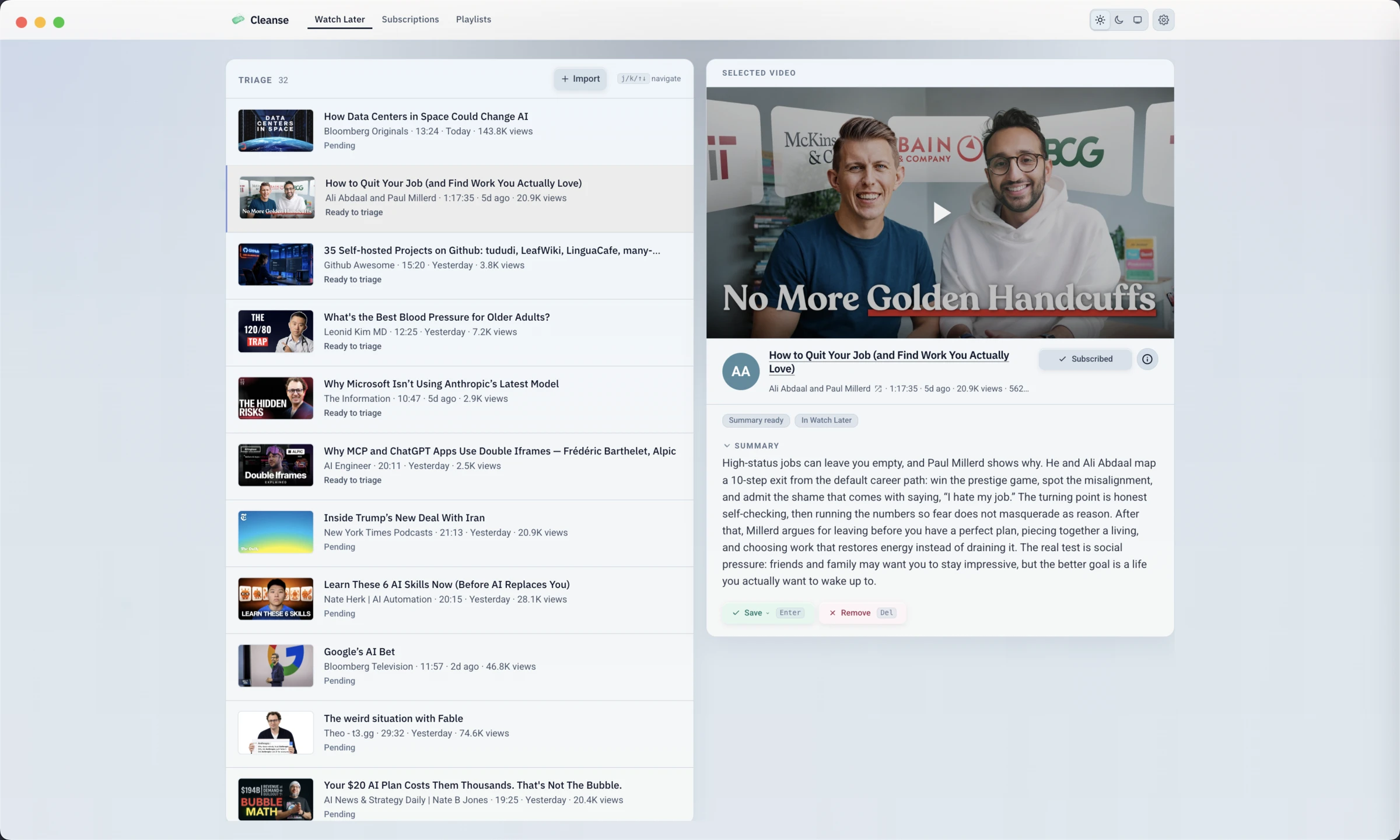
The actual app you download, not a render.
This is Cleanse for Mac running. Your Watch Later sits on the left; the summary and a one-key keep-or-remove decision sit on the right. Read first, decide fast, and the queue clears.
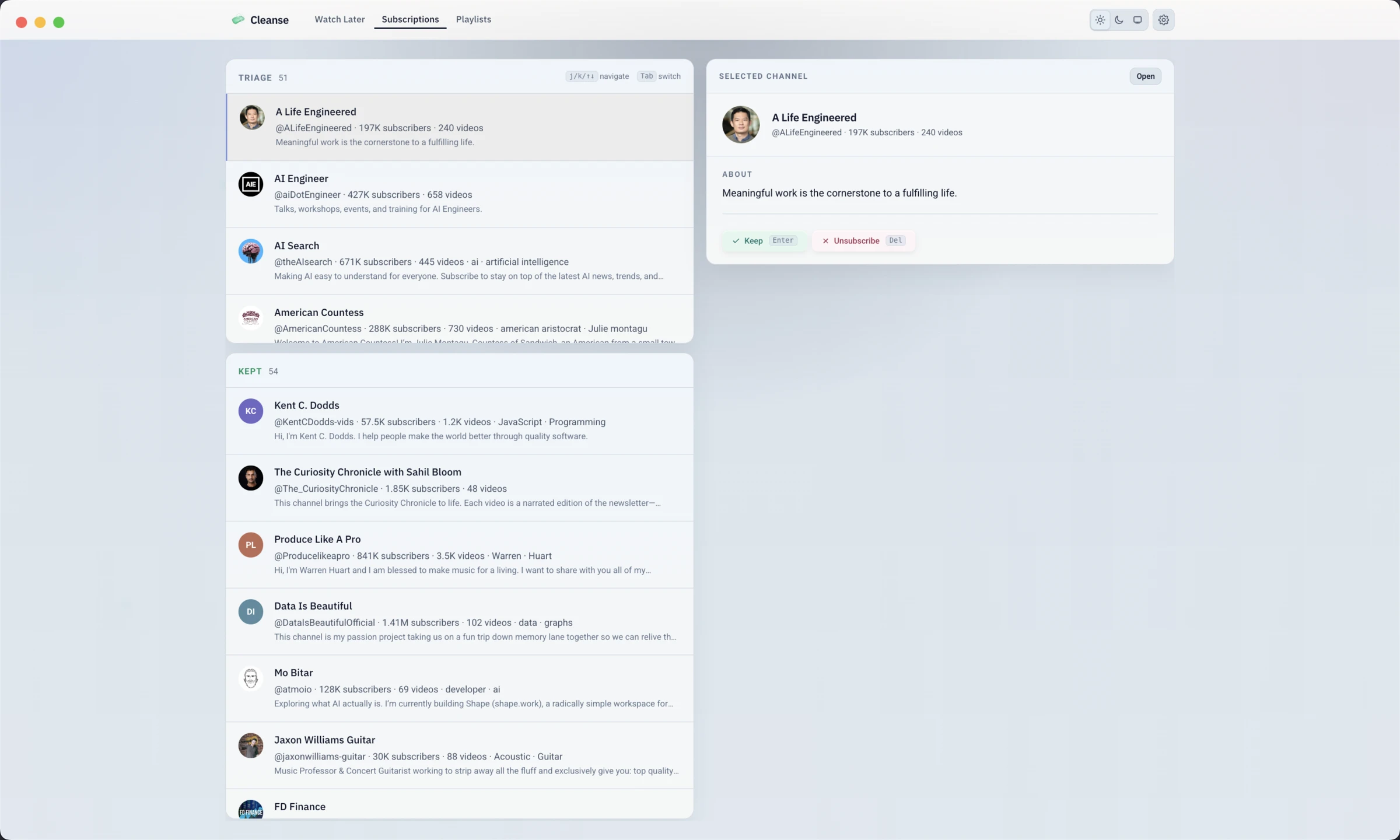
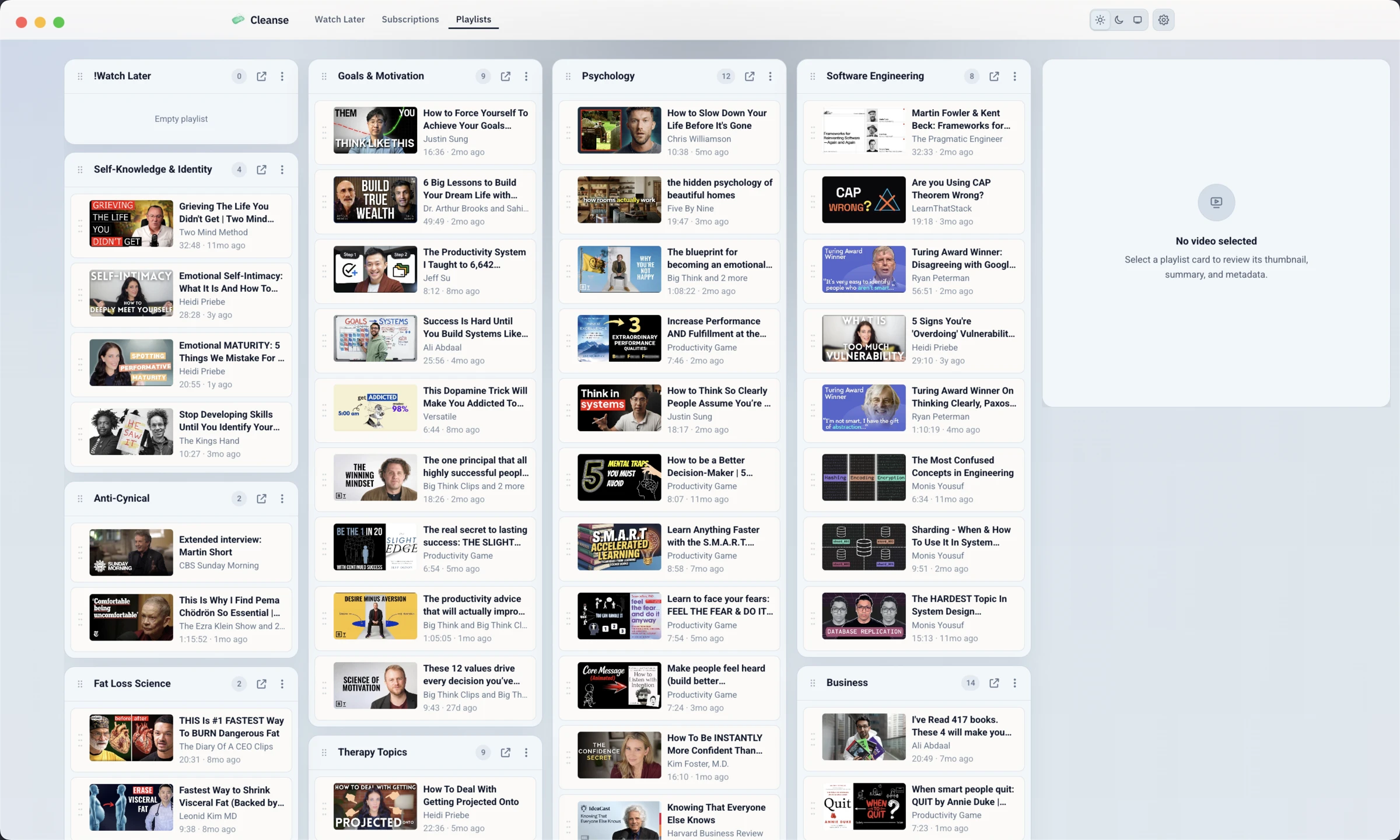
Subscriptions and playlists work the same way. Review each channel you follow, then keep it or unsubscribe. Sort anything worth keeping into a collection. The same read-then-decide rhythm runs through the app.
Turn a video into one shareable page.
Alongside the short summary, deep summary, and transcript, Cleanse can render a structured infographic for any saved video. Five sections, real source images, a clear next action. Useful on its own, even before anyone opens the original.
Five sections, one page
A glanceable visual restatement of the video: the verdict, the trade-offs, the proof, and what to do next.
Built to share
Send it in a text, paste it into a doc, post it in a group chat, or save it next to your notes. The original YouTube link travels with it.
AI is optional
Infographics use your own AI image provider when you want them. A free on-device version is in the works.
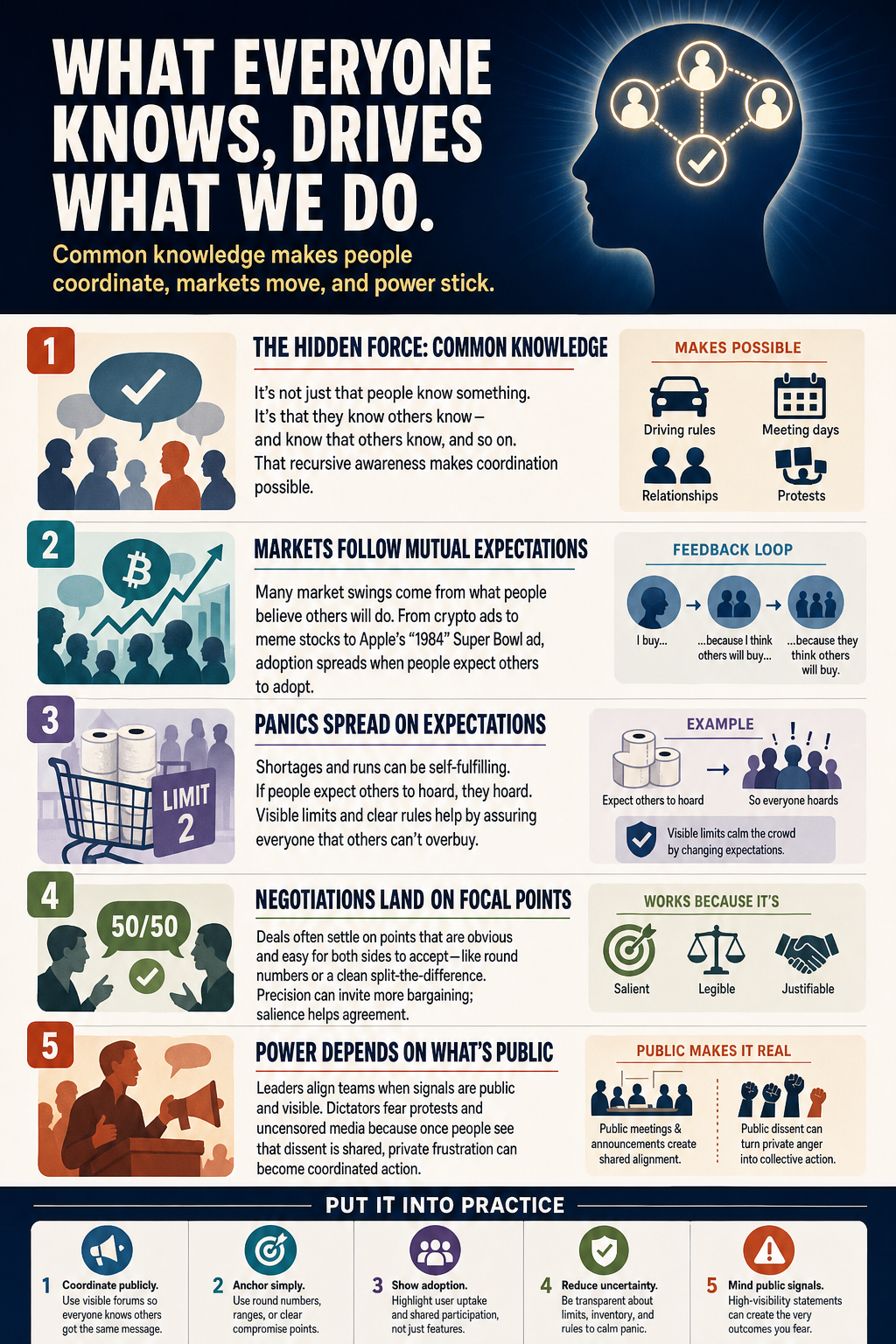
Generated from a saved video · share it as an image
See the queue get smaller before you buy.
The free trial is enough for a real Watch Later review pass. This example shows the kind of decision record Cleanse is built to create.
Founder dogfood, one afternoon: 53 reviewed, 45 removed, just 8 kept — about 23 hours of watch time avoided in a single sitting.
About 23 hours you did not have to watch — and a queue you can actually re-enter.
Videos reviewed
53
Videos kept
8
KEEPVideos removed
45
REMOVEWatch time avoided
22h 51m
Unlock unlimited review — $59
A review loop for every video you meant to come back to.
Cleanse for Mac pulls in Watch Later, your subscriptions, and your existing playlists, then gives every saved video a way to resolve: short summary, deep summary, transcript, playlist, share, export, remove, or unsubscribe from the channel.
Decide before you watch
Start with the short summary so a saved video can become a yes, no, or later without stealing the whole hour.
Keep the substance
Open the deep summary and transcript when the idea is worth preserving, quoting, or studying.
Organize into real playlists
Create YouTube playlists, merge overlapping ones, and use AI organize when Watch Later has patterns worth grouping.
Remove videos and unsubscribe
Clear videos from Watch Later, review your subscriptions, and unsubscribe when a channel no longer earns its slot.
Free on-device AI, your key optional
AI summaries run free on-device (Gemma), no key needed. Bring your own OpenAI or Anthropic key for more capable models, or use Codex CLI or Claude Code CLI.
Share summaries with the source attached
Share a concise short summary through the native Apple share sheet, or export Markdown, text, JSON, or PDF. The original YouTube link travels with the decision.
Who Cleanse for Mac fits best.
Cleanse runs on macOS and works on Watch Later, subscriptions, and playlists. It is most useful when saved videos have become part of how you learn, but the queue needs decisions: summarize, read the transcript, organize into a playlist, share, remove, or unsubscribe from the channel.
Your Watch Later queue is too big to casually browse.
You save videos because they look useful, then forget why.
You want short summaries before committing the full watch time.
You want deep summaries and transcripts for ideas worth keeping.
You want Markdown or PDF exports with the YouTube source attached.
You would rather decide than collect forever.
Your data stays local.
There is no Cleanse backend account. Your Watch Later review state stays local on your Mac, and optional AI requests go directly to your chosen provider.
Read first. Spend time only when it is worth it.
No Cleanse backend account
There is no hosted account system or cloud sync. Your review history and queue data are not sent to a Cleanse server.
Lightweight on-device processing
Local transcription is not an intensive process. It runs comfortably on a 2023 M1 Mac, and processing stays on your machine.
Free on-device AI, your key optional
AI summaries run free on-device (Gemma) with no key. For more capable models, bring your own OpenAI or Anthropic key, or use Codex CLI or Claude Code CLI.
You control the app data
Review state stays local on your Mac. Clear local data in Settings whenever you want a fresh start.
FAQ
Questions and answers.
Privacy, pricing, AI setup, exports, and how the Mac YouTube release actually behaves.
Ask the boring questions first. The product gets sharper when you do.
Pricing
Review 50 saved videos free. Buy once if it saves your queue.
Start with the free trial: 50 saved videos, no credit card, no time limit. If it earns its place, buy once for $59. Your product key arrives by email and unlocks the trial as the full app.
- 50 saved videos free, no credit card
- Watch Later, subscriptions, and playlists
- Short summaries before you spend the watch time
- Deep summaries and transcripts when it matters
- Playlists, merge, and AI organize
- Apple share summaries with the YouTube source attached
- Markdown, text, JSON, and PDF export
- Local review state on your Mac
- 14-day refund and first year of updates
Free to start
50 videosTry Cleanse on 50 saved videos. No credit card. No time limit. Decide after you have used it.
Buy once
One-time purchase. First year of updates included. After that, updates are $25/yr and optional. You keep your version either way.